


Unity Catalog, a unified governance solution for data and AI assets on Azure Databricks.
Overview of Unity Catalog
Unity Catalog provides centralized access control, auditing, lineage, and data discovery capabilities across Azure Databricks workspaces.
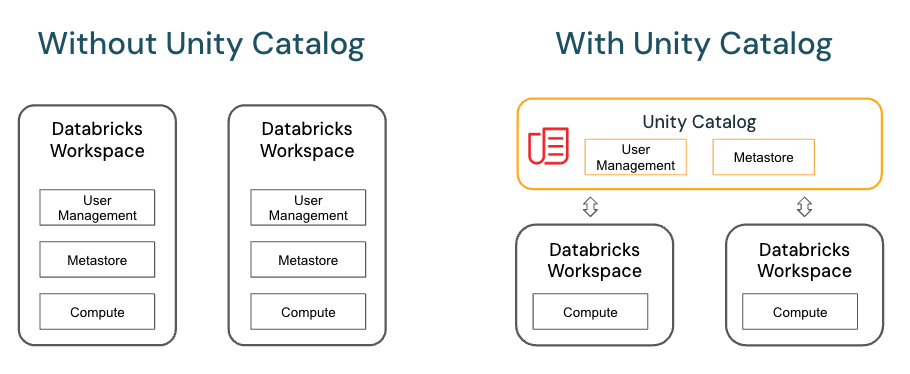
Key features of Unity Catalog include:
- Define once, secure everywhere: Unity Catalog offers a single place to administer data access policies that apply across all workspaces.
- Standards-compliant security model: Unity Catalog’s security model is based on standard ANSI SQL and allows administrators to grant permissions in their existing data lake using familiar syntax, at the level of catalogs, schemas (also called databases), tables, and views.
- Built-in auditing and lineage: Unity Catalog automatically captures user-level audit logs that record access to your data. Unity Catalog also captures lineage data that tracks how data assets are created and used across all languages.
- Data discovery: Unity Catalog lets you tag and document data assets, and provides a search interface to help data consumers find data.
- System tables (Public Preview): Unity Catalog lets you easily access and query your account’s operational data, including audit logs, billable usage, and lineage.
In Unity Catalog, all metadata is registered in a metastore. The hierarchy of database objects in any Unity Catalog metastore is divided into three levels, represented as a three-level namespace (catalog.schema.table-etc) when you reference tables, views, volumes, models, and functions.
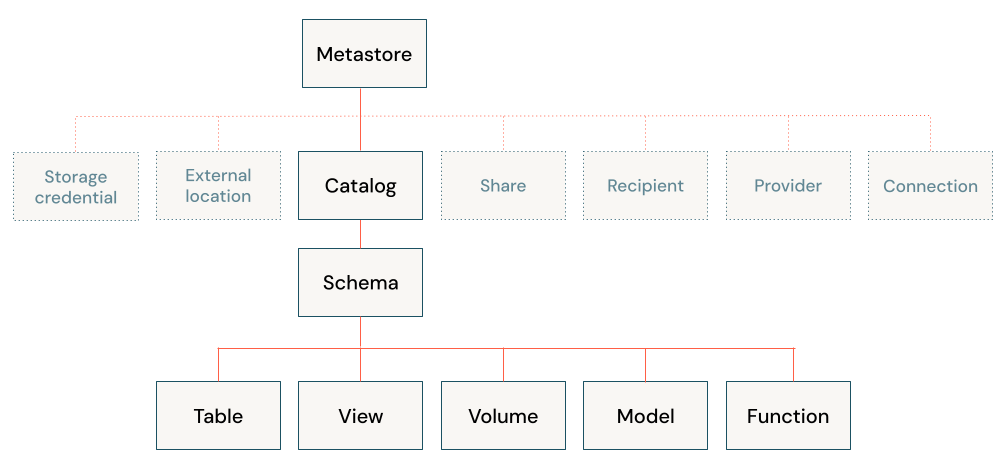
The metastore is the top-level container for metadata in Unity Catalog. It registers metadata about data and AI assets and the permissions that govern access to them. For a workspace to use Unity Catalog, it must have a Unity Catalog metastore attached.
You should have one metastore for each region in which you have workspaces. How does a workspace get attached to a metastore? See How do I set up Unity Catalog for my organization?.
Object hierarchy in the metastore
In a Unity Catalog metastore, the three-level database object hierarchy consists of catalogs that contain schemas, which in turn contain data and AI objects, like tables and models.
Level one:
- Catalogs are used to organize your data assets and are typically used as the top level in your data isolation scheme. Catalogs often mirror organizational units or software development lifecycle scopes. See What are catalogs in Azure Databricks?.
- Non-data securable objects, such as storage credentials and external locations, are used to managed your data governance model in Unity Catalog. These also live directly under the metastore. They are described in more detail in Other securable objects.
Level two:
- Schemas (also known as databases) contain tables, views, volumes, AI models, and functions. Schemas organize data and AI assets into logical categories that are more granular than catalogs. Typically a schema represents a single use case, project, or team sandbox. See What are schemas in Azure Databricks?.
Level three:
- Volumes are logical volumes of unstructured, non-tabular data in cloud object storage. Volumes can be either managed, with Unity Catalog managing the full lifecycle and layout of the data in storage, or external, with Unity Catalog managing access to the data from within Azure Databricks, but not managing access to the data in cloud storage from other clients. See What are Unity Catalog volumes? and Managed versus external tables and volumes.
- Tables are collections of data organized by rows and columns. Tables can be either managed, with Unity Catalog managing the full lifecycle of the table, or external, with Unity Catalog managing access to the data from within Azure Databricks, but not managing access to the data in cloud storage from other clients. See What are tables and views? and Managed versus external tables and volumes.
- Views are saved queries against one or more tables. See What is a view?.
- Functions are units of saved logic that return a scalar value or set of rows. See User-defined functions (UDFs) in Unity Catalog.
- Models are AI models packaged with MLflow and registered in Unity Catalog as functions. See Manage model lifecycle in Unity Catalog.
Working with database objects in Unity Catalog
Working with database objects in Unity Catalog is very similar to working with database objects that are registered in a Hive metastore, with the exception that a Hive metastore doesn’t include catalogs in the object namespace. You can use familiar ANSI syntax to create database objects, manage database objects, manage permissions, and work with data in Unity Catalog. You can also create database objects, manage database objects, and manage permissions on database objects using the Catalog Explorer UI.
How to Get Started with Unity Catalog:
- Setting up Unity Catalog:
- You need to create a Unity Catalog metastore in your Azure Databricks workspace.
- After that, you can register your data assets (such as Delta Lake tables) under the catalog.
- Creating and Managing Data:
- Once your data is registered, you can create schemas and tables, and manage permissions via the Databricks interface or through SQL commands.
- Access Control:
- You can assign roles and permissions (e.g., read, write, modify) at different levels: Catalog, Schema, Table, and Column.
Example Commands in Unity Catalog:
- Creating a Catalog:
CREATE CATALOG my_catalog; - Creating a Schema within a Catalog:
CREATE SCHEMA my_catalog.my_schema; - Creating a Table:
CREATE TABLE my_catalog.my_schema.my_table (id INT, name STRING);
The Unity Catalog is generally part of a broader effort by Databricks to simplify data governance in a unified environment across cloud services.